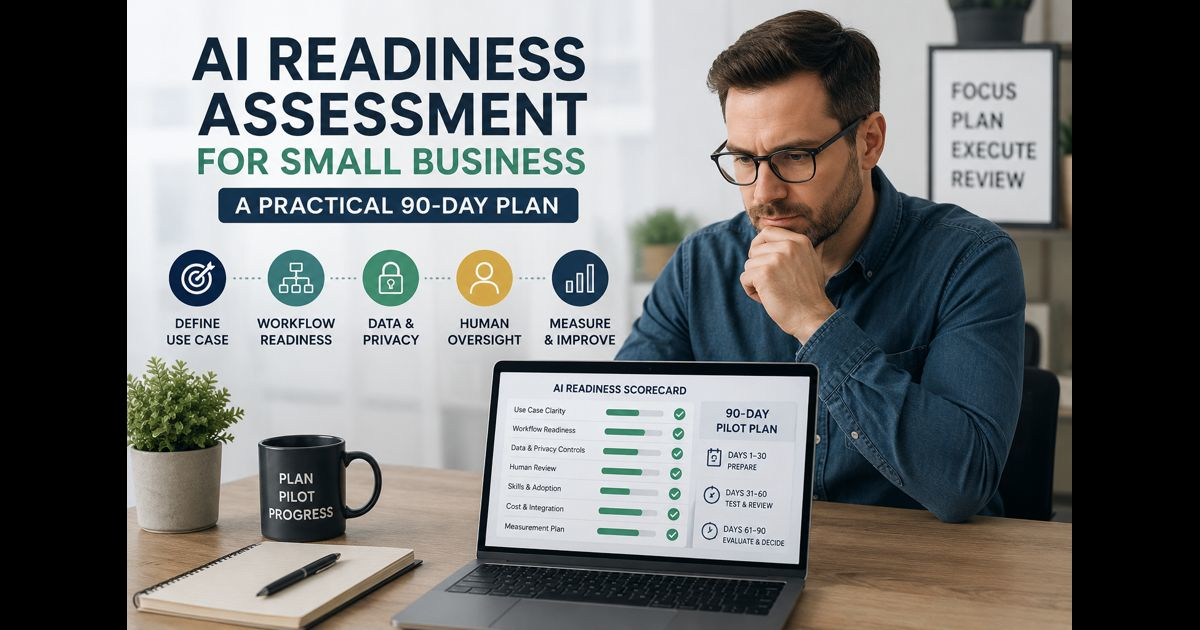
An AI readiness assessment for small business helps an owner decide whether artificial intelligence can solve a real operational problem now, what must be prepared first, and where human review must remain in place.
The assessment is not a test of whether a business uses the newest tools. It is a structured review of business goals, workflows, data, skills, security, and accountability. A small business may be ready to use AI for one narrow task—such as organizing meeting notes or drafting first versions of routine customer replies—while not being ready to use it for hiring decisions, financial approvals, or sensitive customer information.
That distinction matters. AI can make useful work faster, but it can also produce incorrect, incomplete, or unsuitable output. Small businesses benefit most when they begin with a clearly defined task, protect the information involved, and check whether the result actually improves the work.
Start With the Business Problem, Not the Tool
A good assessment begins with a problem that employees already understand.
Examples include a support team repeatedly answering the same non-sensitive questions, a manager spending too long turning meeting notes into action lists, or a marketing team needing help creating first-draft content from approved information. These are clearer starting points than simply deciding that the business “needs AI.”
Write down the current process before looking at software:
- What task takes too much time?
- Who does it and how often?
- What information is required?
- What errors or delays occur now?
- What would a useful improvement look like?
- What must a person still decide or approve?
A business should not adopt AI merely because a competitor uses it. The better question is whether it can reduce a specific friction point without creating a larger problem elsewhere.
For example, an AI tool may summarize internal meeting notes well. It should not automatically send commitments to clients, change project deadlines, or make final decisions from incomplete context.
The Six Areas to Assess
1. Clear use case
The first requirement is a narrow, measurable use case. “Use AI for marketing” is too broad. “Create a first draft of product-description variations from an approved product brief” is specific enough to test.
Choose a first use case that is:
- Repetitive but not high-stakes
- Easy to review before use
- Based on information the business is permitted to use
- Linked to a useful outcome, such as less administrative time or faster response preparation
- Reversible if the tool does not perform well
Avoid using a first pilot for legal, medical, employment, lending, disciplinary, or pricing decisions. These activities can create serious consequences if the output is inaccurate, biased, or misunderstood.
2. Workflow readiness
AI should fit an existing workflow or improve one deliberately. If a process has no owner, no documented steps, and no agreed result, adding AI usually creates more confusion rather than less.
Map the workflow in simple language:
- What starts the task?
- Who provides the input?
- What does the AI tool produce?
- Who checks the output?
- Where is the approved work stored or sent?
- How will the business know whether the pilot helped?
This is closely connected to business process automation services. Automation can handle repeatable steps, while AI may help interpret, draft, classify, or summarize information. Neither replaces the need for a clear process owner.
3. Data and privacy controls
A small business must know what data is entering an AI tool before employees begin using it.
Create a simple data rule with three categories:
- Generally suitable: public information, approved marketing copy, non-sensitive templates, and fictional examples.
- Requires approval: internal documents, supplier information, project notes, or customer communications that may contain confidential details.
- Do not enter: passwords, payment-card data, identity documents, private health information, confidential legal material, or customer data that the business has no right to share.
Review the tool’s privacy settings, data-retention terms, account permissions, and whether submitted information may be used to improve the provider’s systems. Also decide who is allowed to create accounts and connect business files.
The U.S. Small Business Administration advises small businesses to consider both the benefits and risks of AI, while the Federal Trade Commission has emphasized the importance of meeting privacy and confidentiality commitments. SBA guidance and FTC guidance are useful starting points, but businesses should also consider the laws and contractual duties that apply to their location and industry.
4. Human review and accountability
AI output is not automatically accurate, current, original, or appropriate for the audience. A readiness assessment should name the person responsible for checking each kind of output.
Human review is especially important when the work includes:
- Facts, statistics, quotations, or references
- Customer-facing promises or policies
- Brand-sensitive communication
- Financial, legal, health, or employment information
- Recommendations that could affect a person’s rights, safety, or access to services
The reviewer should have enough knowledge to identify errors. A general manager may be able to check whether a meeting summary is complete, but a qualified professional should review specialist advice before it is given to customers.
For written material, the reviewer should check factual accuracy, missing context, unsupported claims, confidential information, tone, and whether the content actually answers the intended question.
5. Skills and adoption
A tool is only useful when the people using it understand its limits.
Employees do not need to become AI engineers. They do need practical guidance on writing clear instructions, protecting information, checking results, and escalating concerns. A short internal guide is often enough for a first pilot.
It should explain:
- Approved use cases
- Prohibited information and activities
- How to label or store AI-assisted work when necessary
- Who reviews output
- What to do when an answer is uncertain, harmful, or clearly wrong
- How employees can report a problem
Training should make it clear that AI is assistance, not authority. Employees should feel able to question a result instead of assuming that a confident answer is correct.
6. Cost, integration, and long-term fit
Free trials can make a tool look inexpensive until teams depend on it, data limits change, or several subscriptions accumulate. Before choosing a tool, calculate the full cost of ownership.
Consider:
- Per-user and usage-based fees
- Time required for setup and training
- Integration with current email, documents, CRM, or project systems
- Security features and user-access controls
- Export options if the business later changes tools
- The cost of human review
- The impact if the tool is unavailable
Technology should support a defined outcome, not create a disconnected collection of subscriptions. That principle also applies to broader digital transformation: a tool is valuable only when it improves the wider process, service, or decision it was chosen to support.
A Simple AI Readiness Scorecard
Score each statement from 0 to 2.
- 0: not in place
- 1: partly in place
- 2: clearly in place
|
Assessment statement |
Score |
|
We have identified one specific business problem AI may help solve. |
/2 |
|
We know who owns the workflow and approves the result. |
/2 |
|
We can describe the information that may and may not be entered into the tool. |
/2 |
|
The first use case is low-risk and reversible. |
/2 |
|
A qualified person will review output before it is used externally or for important decisions. |
/2 |
|
Employees have basic guidance on safe use and reporting mistakes. |
/2 |
|
We understand the expected cost, limits, and access controls. |
/2 |
|
We have a simple way to measure whether the pilot improves the work. |
/2 |
13–16: Ready for a small, controlled pilot.
8–12: Promising, but address the weakest areas before broader use.
0–7: Focus on the process, data rules, and ownership before choosing a tool.
A low score is not failure. It simply shows that the business may need better foundations before AI can create reliable value.
Build a 90-Day Pilot Instead of a Company-Wide Rollout
Days 1–30: Choose and prepare
Select one use case, appoint an owner, document the current process, and establish data rules. Choose a small group of users rather than giving every employee access immediately.
Set a baseline. If the goal is faster preparation of customer-support drafts, record how long the work currently takes and how often a draft needs correction.
Days 31–60: Test with review
Run the pilot using real but permitted work. Keep a record of useful outputs, errors, rework, privacy concerns, and situations where the tool should not have been used.
Do not measure success only by speed. A faster process that creates inaccurate messages, weakens trust, or increases review time is not a successful process.
Days 61–90: Evaluate and decide
Review the evidence with the people who used the tool. Ask:
- Did the pilot save meaningful time?
- Did quality improve, stay the same, or decline?
- Were the data rules practical?
- Did employees understand when not to use the tool?
- Did the tool create new costs or dependencies?
- Should the business continue, revise, expand, or stop the pilot?
Document the decision. If the pilot continues, update the internal guidance and reassess regularly as the tool, workflow, or business risk changes.
Common Readiness Mistakes
The most common mistake is treating AI as a shortcut around good judgment. Other problems include giving a tool unrestricted access to company information, allowing output to be published without review, and using vague promises of efficiency instead of measurable goals.
Another mistake is trying to automate too much at once. A small business can learn far more from one controlled workflow than from a rushed rollout across sales, operations, customer service, and marketing.
The National Institute of Standards and Technology’s AI Risk Management Framework emphasizes that AI risks should be identified, assessed, managed, and monitored over time. Its approach can be scaled down for a small business: know the use case, assign responsibility, keep records, review risks, and change course when evidence requires it.
Final Thoughts
An AI readiness assessment for small business is not about proving that a company is advanced enough to use artificial intelligence. It is about deciding where AI can be useful without giving it more responsibility than the business can safely manage.
The strongest first step is usually modest: one real problem, one accountable owner, one protected workflow, and one measurable pilot. When a business combines clear goals with privacy safeguards and human judgment, it can make better decisions about where AI belongs—and where it does not.
Frequently Asked Questions
Does a small business need a formal AI policy?
A short written policy is usually worthwhile once employees use AI for business work. It should cover approved uses, restricted information, review responsibilities, and how to report problems. It does not need to be complex to be useful.
Can AI be used with customer information?
Only after the business understands what information is being shared, whether it has permission to use it that way, and how the tool handles storage, retention, and access. Sensitive information requires greater caution and may need professional legal or compliance advice.
Which AI task should a small business try first?
Start with a low-risk, repetitive task where a person can easily check the result. Examples may include creating outlines from approved information, summarizing internal notes, or preparing first drafts of routine material.
How often should an AI readiness assessment be repeated?
Review it before a new use case, a major tool change, or a change in the data being used. A regular review every few months also helps a business identify new risks, costs, or workflow issues.
Does AI replace employees?
AI may assist with parts of a task, but it does not remove the need for people to set goals, protect information, apply context, verify results, and take responsibility for decisions.